



Most surprise AWS bills do not come from the services you were watching closely. They come from a handful of quiet charges that sit in the background, do not show up as a single obvious line item, and only get noticed once the invoice arrives. NAT Gateway fees, data transfer charges, and forgotten idle resources are the three most common culprits, and all three are avoidable once you know where to look.
The good news is that none of these require deep AWS expertise to catch. Once you understand where these costs hide, spotting and fixing them takes minutes, not hours.
A hidden cost is not something AWS is trying to trick you with. It is simply a charge that is technically documented but easy to overlook, because it is not tied to a big, obvious resource like an EC2 instance or an RDS database. Instead, it is often a small per-hour or per-gigabyte fee attached to something you set up once and forgot about, like a networking component or an unused storage volume.
These charges are dangerous specifically because they scale quietly. A single NAT Gateway sitting idle costs about $32 a month. That alone is easy to miss. But multiply that across a few environments, dev, staging, and production, and it adds up to a real, recurring cost nobody budgeted for.
It also helps to understand why these costs exist in the first place. AWS’s pricing model is built around metering almost everything, compute, storage, and networking, down to very granular units. That approach is genuinely useful for large, optimized workloads, since it means you only pay for what you use. But it also means small architectural defaults, the kind nobody thinks twice about when first setting up an account, can quietly become recurring charges once traffic and infrastructure grow.
If there is one single AWS charge that catches people off guard more than any other, it is the NAT Gateway. A NAT Gateway lets resources in a private subnet reach the internet, and AWS charges for it in two separate ways at the same time.
| Charge Type | Approximate Cost |
|---|---|
| Hourly charge (just for existing) | About $0.045 per hour, roughly $32 per month |
| Data processing fee | $0.045 per GB of traffic that passes through |
| Combined with standard data transfer out | An additional $0.09 per GB on top |
That means traffic leaving through a NAT Gateway can cost around $0.135 per GB total, about 50 percent more than people expect from data transfer alone. Worse, traffic to AWS services like S3 or DynamoDB from a private subnet often gets routed through the NAT Gateway by default, even though that traffic never actually leaves AWS’s own network. There are real, documented cases of businesses accidentally racking up over a thousand dollars in charges this way, simply because a free alternative was never set up.
The fix is usually simple: a VPC Gateway Endpoint for S3 and DynamoDB is completely free and routes that traffic directly, skipping the NAT Gateway entirely.
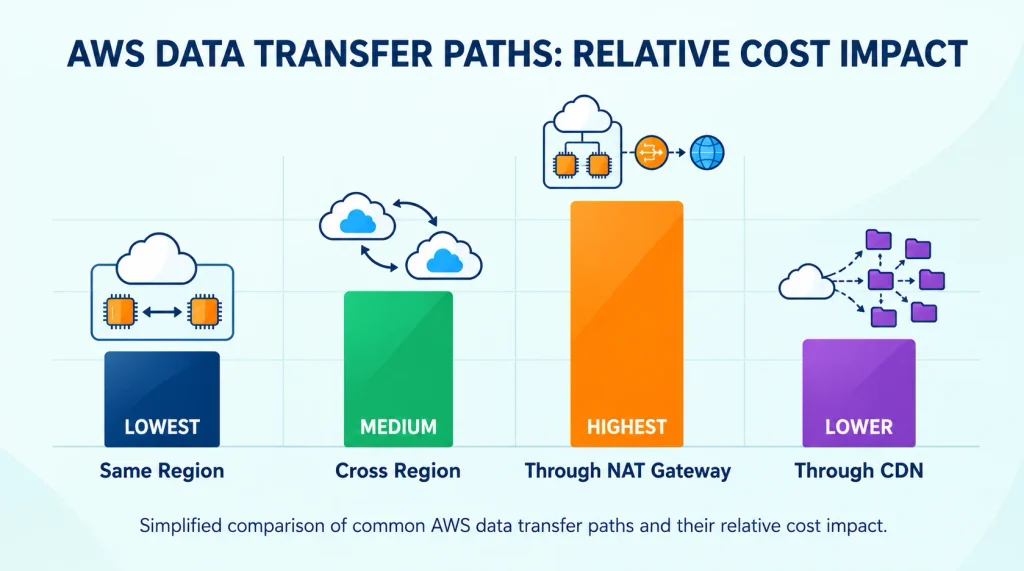
Data transfer is one of those costs that rarely shows up as a clear, single line item, which is exactly why it catches people off guard. It can account for anywhere from 10 to 15 percent of a typical AWS bill, and as much as 40 percent for data-heavy applications like media streaming or analytics platforms.
A few common patterns quietly drive this cost up:
Each of these patterns is easy to miss individually, but they tend to show up together as an application grows, more regions, more internal services, more traffic passing through a load balancer. Of the five, serving files directly from S3 instead of through a CDN is usually the first one worth fixing, since it’s often the biggest single line item and the easiest to change. Setting up a CDN early is far simpler than migrating under pressure once traffic and costs have already climbed.
Not every hidden cost involves complex networking. Some of the simplest ones are just things people forget to clean up.
None of these individually costs a huge amount. But added together across a growing AWS account, they can quietly become a meaningful chunk of a monthly bill, all without providing any real value.
This is especially common on teams that move fast. Spinning up a new EC2 instance, testing something, and terminating it later feels like a clean process, but the EBS volume attached to it often survives the termination unless it was explicitly set to delete on termination. Multiply that across months of regular testing and experimentation, and a surprising number of accounts end up with dozens of orphaned volumes nobody remembers creating.
You do not need to be a cloud architect to catch most of these issues. A simple, repeatable check goes a long way.
If you have already spotted one or more of these issues, the fix is usually straightforward and does not require a major architecture change.
NAT Gateways charge both an hourly fee for existing and a per-gigabyte fee for every byte that passes through, and that data processing fee stacks on top of standard AWS data transfer charges. Traffic to AWS services like S3 also often gets routed through the NAT Gateway by default unless a VPC Endpoint is set up, which adds unnecessary charges for traffic that never left AWS’s network.
Even with zero traffic, a NAT Gateway typically costs around $32 a month in most regions just for existing, since the hourly charge applies whether or not any data passes through it.
Unattached EBS volumes and unused Elastic IP addresses are usually the easiest wins. Both can be found quickly in the EC2 console and deleted with minimal risk once you confirm nothing depends on them.
It depends. Traffic within the same Availability Zone is often free, but traffic across Availability Zones or regions is billed, and traffic routed unnecessarily through a NAT Gateway is billed even when it stays inside AWS’s own network.
Estimating ahead of time with a tool built around real AWS pricing gives you a baseline to compare your actual bill against, so an unexpected jump from a NAT Gateway or forgotten resource stands out immediately instead of blending into a bill you were not tracking closely.
Most of these hidden charges are not caused by complicated mistakes. They come from small, easy-to-overlook defaults that quietly accumulate over time. Once you know where to look, catching them takes minutes, and cleaning them up rarely requires any real trade-off in performance.
If you want a clearer starting point, our free AWS Cost Calculator can help you estimate what your setup should realistically cost, so you have something solid to compare your actual bill against instead of finding out the hard way.


Comments are off for this post.